Portal
The Portal is your central hub for managing and monitoring your integration with Squire. Different roles have access to specific functionalities designed for their needs.
- Product Managers: Access usage statistics and user engagement metrics
- Support Teams: Manage cases, view logs, and handle troubleshooting
- Developers: Manage API credentials, environments, and monitor performance
Getting Started
- Log in to the portal using your personal credentials
- Invite team members and set their respective role
- Contact support if you need additional access or have questions
Managing API keys
Developers can manage API keys within the Portal. API keys are used to create user sessions for initializing the Squire SDK.
Navigate to API Keys
Go to the API Keys page in the settings section of the portal.
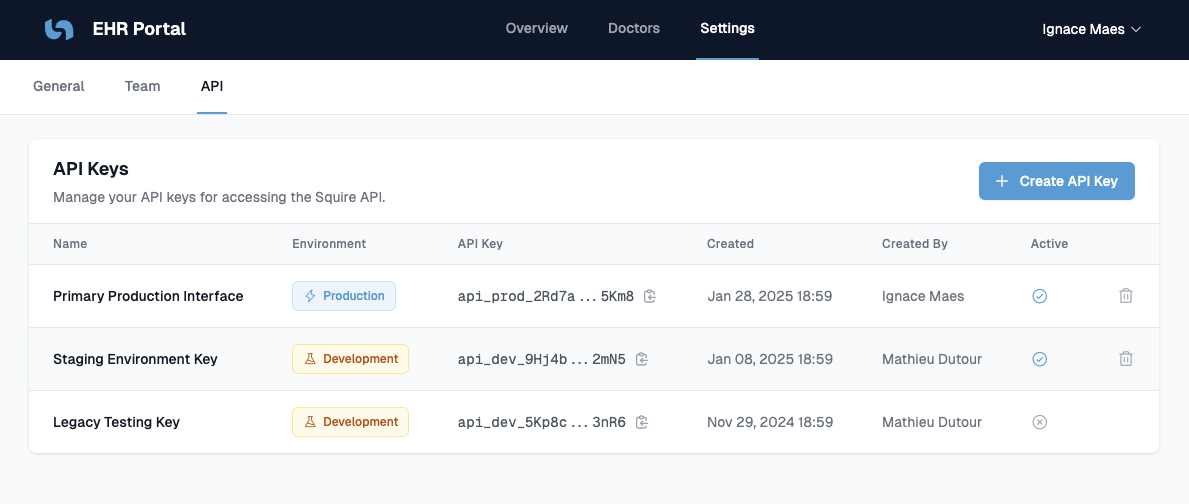
Create a new API key
Click the Create API Key button in the top right corner, and fill in the required information:
- Environment
staging: For testing purposesproduction: For usage with real users
- Key name: internal name for identification purposes
Securely store the API key
Your API key should be stored as secret. It’s a private key and should never be exposed in any client.
If you disclose your key by any accident, create a new one and revoke access for the old one.
Last updated on